
Signature Generator
A Signature Generator makes it easy to create your own digital signature online — just type or draw it, then pick a style. Use it across documents, contracts, forms, and emails.
Need to Sign a PDF? Do It Online in Seconds
Sign PDF OnlineSignature Generator Free: Create Your Digital Signature in Seconds
- What Is a Signature Generator Tool?
- A Quick Guide to create automatic signatures
- A Preview of the Styles
- Where Can You Use e-signatures?
- Signature Inspirations (Famous Signatures)
- Types of Electronic Signatures
- What Does signatures Say About You?
- What Are the Benefits of Signature Generators?
- A Free Signature Generator for Everyone
- Everything You Need in One Place
- Why Choose an Online Signature Generator?
- Conclusion
- Frequently Asked Questions
The days of printing a document, signing it with a pen, and scanning it back in just to send it off are now gone. Today, a signature generator lets you build a personal autograph in seconds — draw it, type it, or watch it animate as a live SVG. If you’ve been comparing options, this doubles as a straightforward digital signature maker and a quick way to draw signature online, without downloads or sign-ups getting in the way. Pick a style, save it as a PNG or JPG, and start signing PDFs, contracts, and emails right away.
What Is a Signature Generator Tool?
This kind of signature creator turns your name into a ready-to-use design — drawn with your mouse or finger, typed in a handwritten-style font, or generated as a live SVG that plays out stroke by stroke. Some sites, like signaturegeneratorfree.com, even let you switch the ink color between blue, black, red, or green before you download the result and start using it on documents and emails.

A Quick Guide to create automatic signatures
Whether you want a cursive signature generator or a bold block-letter look, or you’re testing a signature maker cursive style before locking one in, the same three steps below get you there:
Feel free to run through a bit of signature practice before settling on your final look — most tools let you regenerate as many times as you like.
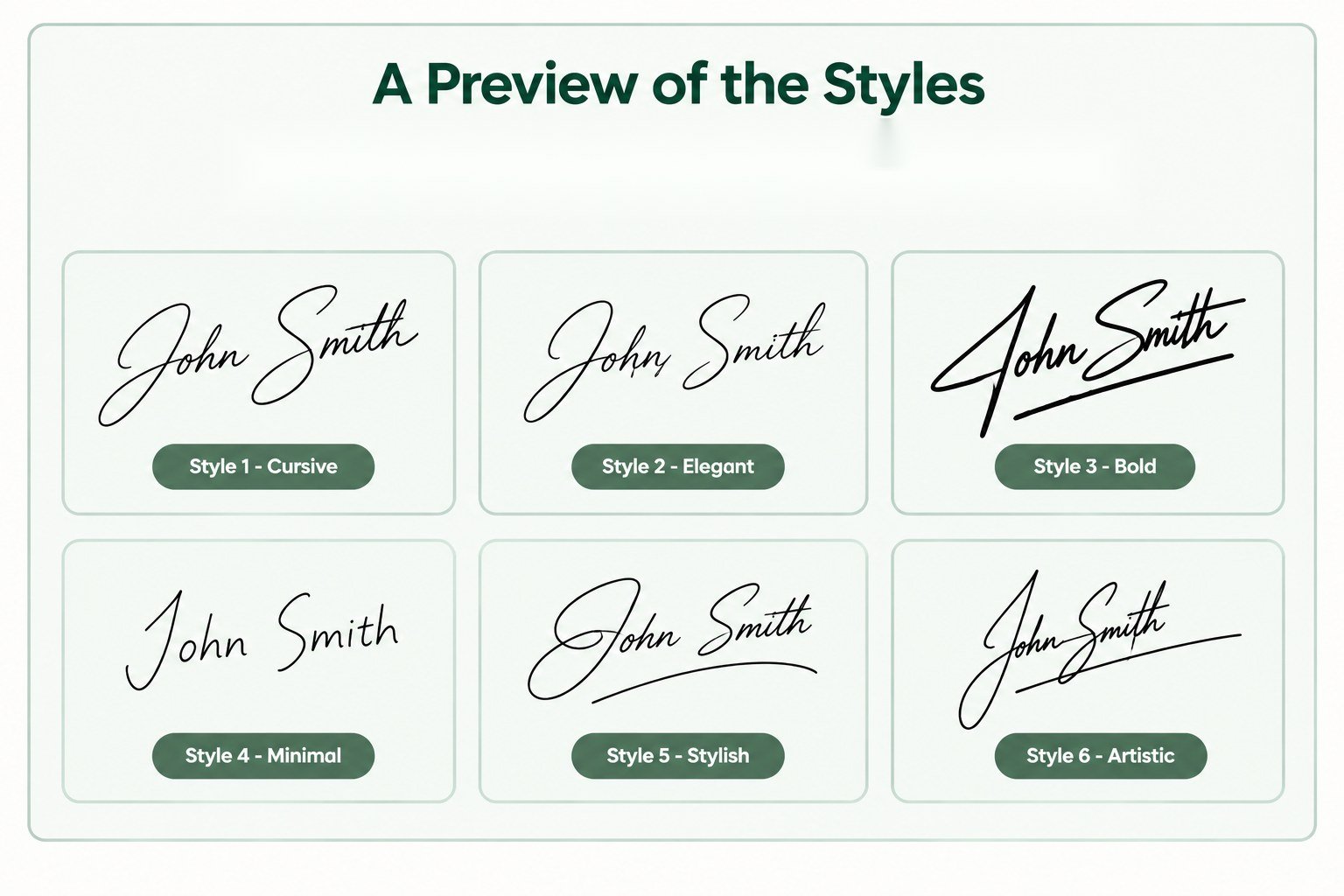
A Preview of the Styles
A quick preview usually explains this better than words. Below is the same name run through a handful of the available styles — useful if you’re still exploring signature ideas for my name or comparing a few looks side by side before you commit to one.
Where Can You Use e-signatures?
Once signatures created, these are not limited to one type of document. You can use it on contracts, NDAs, rental agreements, invoices, and HR paperwork, or for everyday things like giving your emails a more personal sign-off. Basically, anywhere you’d normally reach for a pen and paper, a digital mark can do the job — without a printer or scanner in sight.

Signature Inspirations (Famous Signatures)
If you’re not sure where to start, looking at famous signatures can help. Well-known signatures show just how much personality and professionalism can come through in a few pen strokes — a rushed scrawl on a napkin, a flourish at the bottom of a letter, a name signed thousands of times until it turned into something closer to a symbol. Browsing these can spark handwritten signature ideas for my name, or simply help you land on a unique signature that still feels like you.


These are stylized recreations meant to illustrate character and design, not verified historical documents.
Types of Electronic Signatures
Not all electronic signatures are built the same way. Here are the ones you’ll come across most often:

What Does signatures Say About You?
It’s surprising how much signatures can reveal about you. Big, bold letters often show confidence, while a tidy, easy-to-read style can mean you pay close attention to detail. Here’s a quick look at what some common styles might mean — a handy reference if you’re gathering signature suggestions before settling on your own.
| Signature Style | Personality | Signature Example |
|---|---|---|
| Unreadable letters | A private person who values speed over clarity |
Jn Smth
|
| Easy to read | Honest, open, and straightforward |
John Smith
|
| With underline | Confident, with a strong sense of self |
John Smith
|
| Ends with a flick | Ambitious and forward-thinking |
John Smith~
|
| Upward angle | Optimistic, positive outlook |
John Smith
|
| Downward angle | More reserved or cautious |
John Smith
|
| Slanted | Emotionally expressive and adaptable |
John Smith
|
| Just a nickname | Friendly and approachable |
Johnny
|
| Initials only | Efficient and privacy-conscious |
J.S.
|
| Bold capitals | Assertive and self-assured |
John Smith
|
| No last name | Independent, individual-focused |
John
|
| Large letters | Outgoing, likes attention |
John Smith
|
| Embellished letters | Creative, expressive |
John Smith
|
Still hunting for signature suggestions for my name specifically? Try mixing a couple of these traits until one feels right.
What Are the Benefits of Signature Generators?
The biggest win is time. These tools cut out the printing, signing, and scanning routine and let you make a digital signature in seconds instead. On top of that, you get flexibility — multiple styles, ink colors, and download formats — so the result looks professional and consistent no matter where you use it, whether that’s a contract, an email, or a PDF.

A Free Signature Generator for Everyone
Whether you’re a student, a freelancer, a small business owner, or part of an HR team, this kind of tool is built to fit your workflow, not the other way around. Even a specific search like signature generator for my name usually leads here — there’s no technical skill required and no design experience needed, just open the tool, put yours together, and you’re done. With no cost, no downloads, and no sign-up, it works for pretty much anyone who needs to sign something digitally.
Everything You Need in One Place
Between drawing, typing, and live SVG generation, a good tool brings every feature you’d want into one place — customizable ink colors, multiple font styles, and instant PNG or JPG downloads. Whether you want to make a cool signature for your emails or a clean one for contracts, it’s all handled in one simple, free platform.
Why Choose an Online Signature Generator?
This kind of tool saves you time and hassle — there’s no printing, no scanning, and no design software required. Just open your browser, put one together, and you’re ready to go. It’s free, flexible, and lets you draw, type, or customize the design with different fonts and colors for whatever document you’re working with.
Conclusion
A free signature generator saves you from the whole printer-pen-scanner routine and turns it into something you can knock out from your phone in under two minutes. You can draw it, type it, or build one in a handful of styles, fonts, and ink colors, and it works just as well whether you’re a student handing in a form or an HR team pushing out offer letters. So next time a contract, a PDF, or even just your email sign-off needs a personal touch, this is by far the quickest route there.

Frequently Asked Questions
What is a signature generator?
It’s an online tool that turns your name into a digital signature — by drawing, typing, or generating it with AI — ready to download and use on documents or emails.
Is it free to use?
Yes, most tools like this are completely free, with no hidden charges for creating or downloading a basic signature.
Can I draw my own signature with this tool?
Yes, you can draw your signature using a mouse, touchscreen, or stylus for a natural, handwritten look.
Can I use my signature in PDF or Word documents?
Absolutely — once downloaded as a PNG or JPG, your signature can be inserted into PDFs, Word files, and most other document formats.
What formats can I download my signature in?
Most tools let you download your signature as a PNG (often with a transparent background) or a JPG image.
Is my signature saved or stored online?
Generally no — most tools create your signature directly in your browser and don’t store it on a server unless you choose to save it to an account.
Can I customize my signature style?
Yes, you can usually adjust the font, ink color, stroke weight, and overall style before downloading.
Do I need to log in to use it?
No, most tools like this work without any sign-up or login — you can create and download your signature right away.
How do I add my signature to email or other workflows?
Once downloaded, you can upload your signature image into your email settings, document editor, or e-signature platform of choice.
Can this create a signature that looks handwritten?
Yes — typed signatures use handwriting-style fonts, and drawn or AI-generated ones are designed specifically to mimic a natural, handwritten look.
Can I create my signature with blue ink?
Yes — this tool let you switch the ink color before downloading, so you can go with blue, black, red, green, or whatever fits the document you’re signing.